
As AEM becomes central for delivering rich experiences, seamless integration with external services and APIs is crucial. Reverse proxies in AEM (via CDN/Dispatcher) offer a powerful solution for offloading external API calls, simplifying implementations, and optimizing performance.
For better unerstanding of issues when “AEM is used directly to return External APIs content”, please refer to Do not use AEM as a proxy for backend calls by Jörg Hoh
This blog briefly explains forward and reverse proxies, then quickly transitions to highlighting the use of reverse proxies with AEM for integrating with third-party APIs.
Forward Proxy
A forward proxy is a server that acts on behalf of clients when they want to access internet servers (like websites or web apps). It’s like a middleman that forwards your requests to the internet servers and brings back the responses to you.
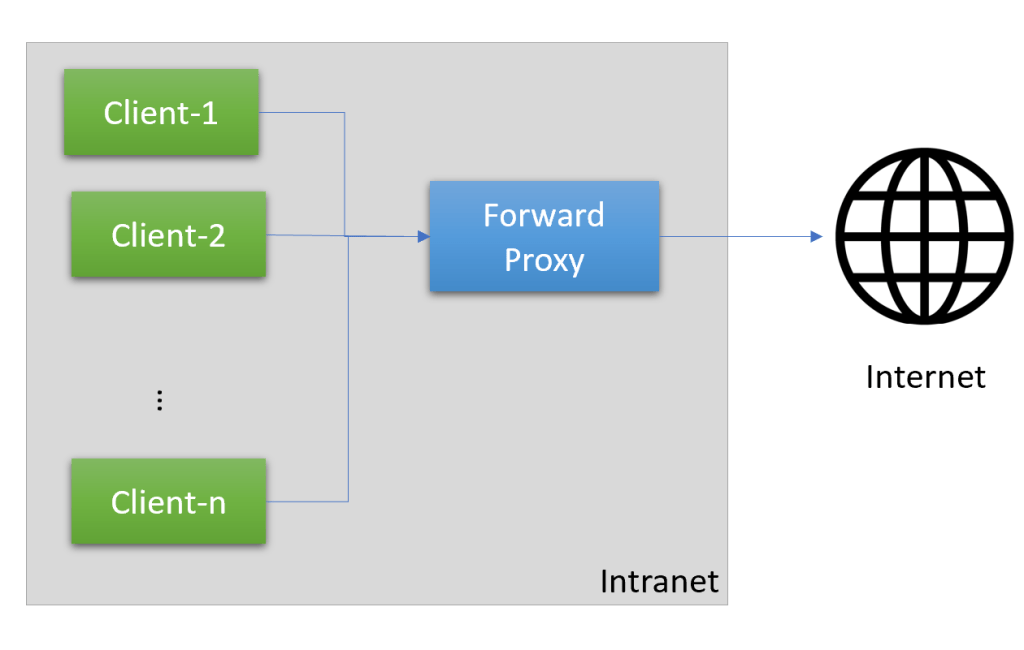
Imagine you’re at work, and your company has set up a forward proxy server. When you try to access a website, your request goes to the forward proxy first. The proxy checks if the website is allowed based on company policies, and if it is, it forwards your request to the website’s server and brings back the response to your computer.
Flow:
- Your computer sends a request to the forward proxy.
- The forward proxy checks the request and applies any rules or policies.
- If allowed, the proxy forwards the request to the internet server.
- The internet server responds, and the response goes back through the proxy.
- The proxy delivers the response to your computer.
Benefits and Use Cases:
- Web Filtering: Companies use forward proxies to control and filter web access based on policies.
- Better Management: Companies can control and monitor internet usage, ensuring employees stay focused on work. This can help improve productivity.
- Caching: Forward proxies can store (cache) frequently accessed web pages, reducing bandwidth and improving speed.
- Privacy and Anonymity: Forward proxies can hide your real IP address, providing privacy when browsing the internet.
- Security: The proxy can scan websites for malware and other threats before allowing access. This adds an extra layer of security for company data.
Reverse Proxy
A reverse proxy is a server that sits between the internet and the backend servers that host a website or web application. It retrieves resources from the backend servers and returns the content to the client (your web browser), acting as an intermediary.
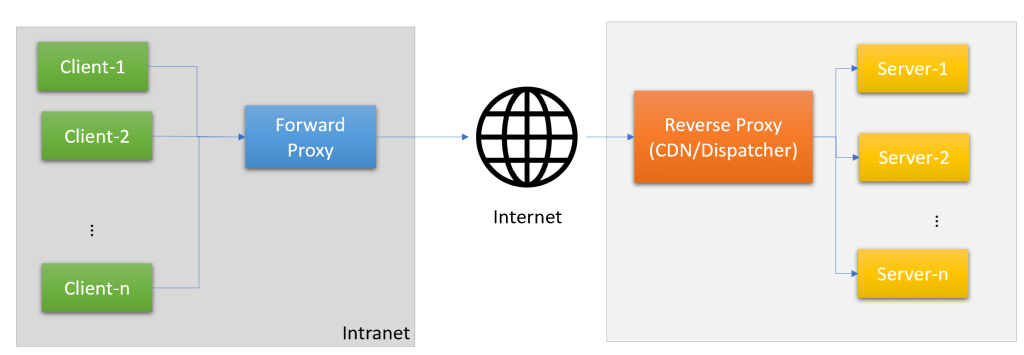
When you visit a popular website like Adobe, your request doesn’t go directly to Adobe’s backend servers. Instead, it goes to a reverse proxy server, which then retrieves the requested content from Amazon’s backend servers and delivers it to your browser.
Flow:
- Your browser sends a request to the website (e.g., Adobe).
- The request goes to the reverse proxy server.
- The reverse proxy server forwards the request to one of Amazon’s backend servers.
- The backend server responds with the requested content.
- The reverse proxy server receives the response and delivers it to your browser.
Benefits and Use Cases:
- Directing Requests to Various Servers: Reverse proxies can direct incoming requests to different backend servers based on specific rules or conditions. This flexibility allows for efficient resource utilization and can simplify application architectures.
- Load Balancing: Reverse proxies distribute incoming traffic across multiple backend servers, ensuring high availability and efficient resource usage.
- SSL/TLS Termination: Reverse proxies can handle secure connections (SSL/TLS), reducing the load on backend servers.
- Caching: Reverse proxies can store (cache) static content, improving performance and reducing backend server load.
- IP Masking: The reverse proxy acts as a shield, hiding the actual IP addresses of the company’s web servers from customers. This adds an extra layer of security. (Think of it like keeping the company’s internal server addresses a secret).
- Compression and Optimization: Reverse proxies can compress and optimize content before delivering it to clients, reducing bandwidth usage and improving speed.
In summary, forward proxies act on behalf of clients, facilitating their requests to internet servers, while reverse proxies act on behalf of servers, facilitating the delivery of content to clients from backend servers. Both types of proxies play crucial roles in enhancing security, performance, and control over network traffic.
AEM + Reverse Proxy
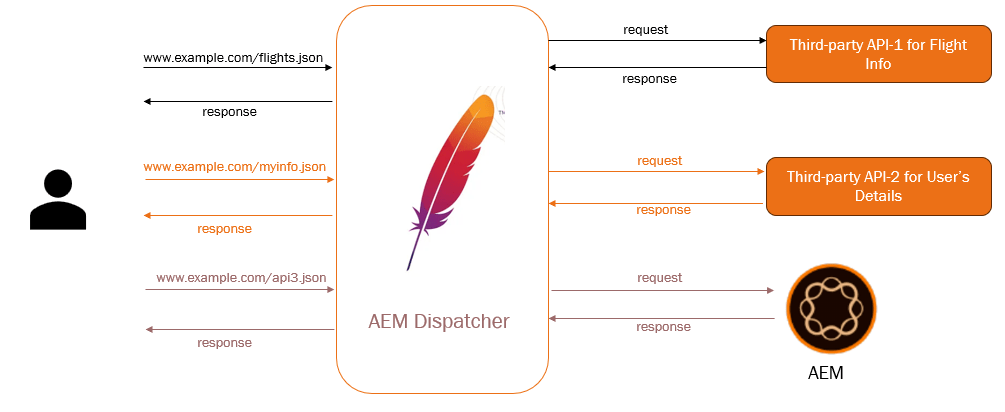
In an AEM implementation, a reverse proxy can be used to redirect certain requests to external APIs, bypassing AEM entirely. For example, if your website needs to fetch real-time data from a third-party service, instead of making the request from AEM (which could be resource-intensive), the reverse proxy can directly forward the request to the external API.
For setting up Reverse Proxy, there are 2 approaches:
Directing Request Via Dispatcher:
Setting up a reverse proxy on the AEM Dispatcher can be achieved by configuring the ProxyPassReverse directive.
Sample config on the Dispatcher:
<LocationMatch "/flights.json">
    RewriteEngine on
    ProxyPass "${HOST1}flights.json"
    RequestHeader set X-System-ID DEV_AEM
    RequestHeader set X-Application-Key "${DEV_AEM_APPLICATION_KEY}"
    ProxyPassReverse "${HOST1}flights.json"
</LocationMatch>- Identify the URL patterns: Determine the URL patterns or paths that should be forwarded to the external API. In the example, the pattern is
/flights.json. - Define the ProxyPass directive: The
ProxyPassdirective specifies the target URL or server where the requests should be forwarded. In the sample config,${HOST1}flights.jsonrepresents the external API endpoint for retrieving flight data. - Set additional request headers (optional): You can optionally set request headers to be included in the forwarded requests. In the example, the headers
X-System-IDandX-Application-Keyare set, likely for authentication or identification purposes with the external API. - Configure the ProxyPassReverse directive: The
ProxyPassReversedirective modifies the response headers from the external API, ensuring that the URLs in the response are correctly rewritten to match the original request URLs.
By configuring the Dispatcher with this ProxyPassReverse setup, any requests matching the /flights.json pattern will be forwarded to the specified external API endpoint, and the responses will be correctly handled and delivered back to the client.
Directing Request Via Adobe-Managed CDN in AEMaaCS (Recommended):
One can define rules to determine when requests should be directed to a specific origin. For details, refer to Origin Selectors

Flow:
- A user’s browser sends a request to access certain data on your website.
- The request goes to the Adobe-managed CDN(reverse proxy server)
- The CDN checks the request and determines that it should be handled by an external API.
- Instead of forwarding the request to Dispatcher, the reverse proxy sends the request directly to the external API’s server.
- The external API responds with the requested data.
- The CDN receives the response and delivers it to the user’s browser.
Benefits of using a reverse proxy with AEM:
- Simplified Implementation: By offloading certain requests to external APIs, you can simplify the implementation within AEM, reducing the complexity of your AEM codebase.
- Improved Performance: Since AEM doesn’t have to handle and process requests for external data, it can focus its resources on delivering core website functionality, improving overall performance.
- Scalability: Separating concerns between AEM and external APIs allows for independent scaling of each component based on demand, optimizing resource utilization.
- Caching: The reverse proxy can cache responses from external APIs, further improving performance and reducing the load on both AEM and the external API servers.
Using a reverse proxy in this manner can help create a more modular and efficient architecture, separating concerns between AEM (which handles core website functionality) and external services (which provide supplementary data or functionality).


Hi Aanchal,
Let me summarize the article. Please correct my statements.
1: Usually while calling the 3rd party API from our AEM application, need to call from Javascript(or JQuery or other Javascript library), rather than calling the API from java class.
In above case, you are calling the http://www.example.com/myinfo.json, http://www.example.com/flights.json API call from Javascript, where as calling http://www.example.com/api3.json from java logic.
Now, for the API http://www.example.com/flights.json, you have done the ReverseProxy setup in Dispatcher (in “Directing Request Via Dispatcher” section), so that we can utilize the ReverseProxy feature while calling the 3rd party API.
-Thanks
Mahesh
LikeLike
Thanks for sharing your understanding.
Usecase: myinfo.json & flights.json can be served by external Apps. Only api3.json is dependent on AEM.
Scenario-1: No reverse proxy set-up
The API calls are made from jquery/javascript. If a Reverse proxy is not set, they would all reach AEM publish. (myinfo.json, flights.json & api3.json). Notice the domain is same (masking IPs of internal systems). Thus, when request reach dispatcher, it forwards all 3 of them to AEM publish
The AEM publish backend code would make a call to external apps and return results. So, AEM’s resources like memory, threadpool etc are used.
Scenario-2: Reverse proxy is set up
Dispatcher is now aware that for URL patterns matching myinfo.json & flights.json have different sources. So, it would send only api3.json request to AEM and remaining to their respective servers.
I hope it helps !
LikeLike
Makes much sense Aanchal. Thanks for the clarification
LikeLiked by 1 person