High-quality images are fundamental to creating engaging digital experiences. A key technique for achieving this quality is clipping path, a process that meticulously isolates the subject of an image from its background. I have seggregated information about clipping path in 2 blogs:
- Current blog explored what/why queries about Clipping path
- For extracting Clipping path in AEM, refer to Clipping Path Extraction in AEM DAM: A Custom Workflow Approach
What is a Clipping Path in Images?
A clipping path is a vector outline used in image editing to isolate a specific subject from its background. It’s like a digital “cookie cutter” that cuts out the desired portion of an image, creating a clean separation. Think of it as a precise outline that defines the exact shape of the object you want to isolate.
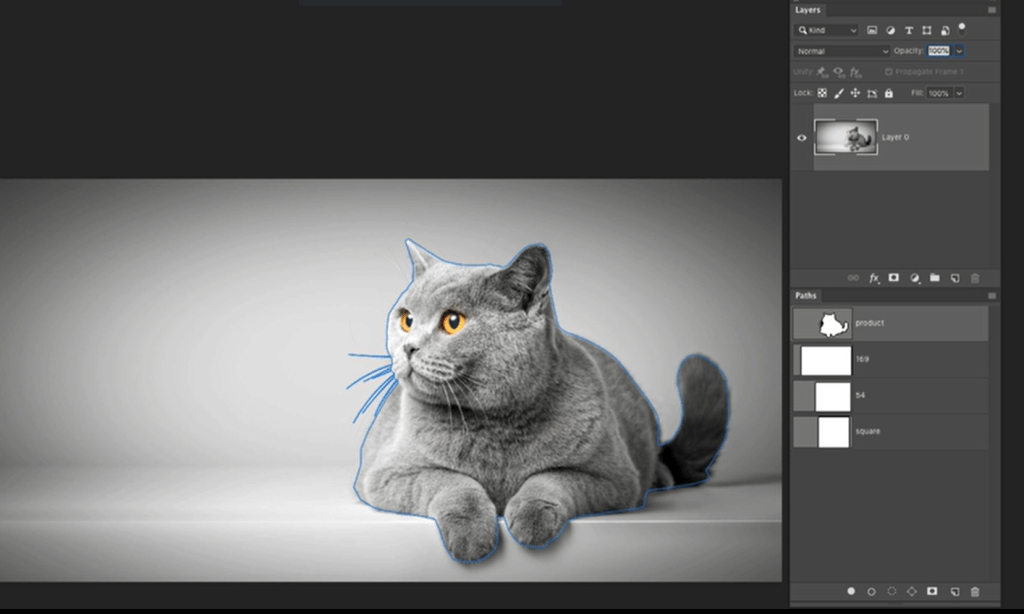
Why is Clipping Path important ?
- Background Removal: Clipping paths allow you to remove the background of an image, leaving only the subject. This is useful for creating product images with transparent backgrounds, for web design, or for placing the subject into a new background.
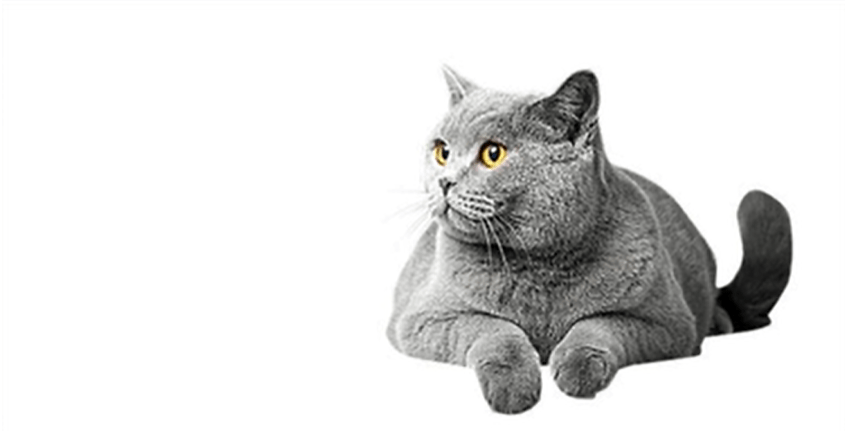
- Image Manipulation: By isolating the subject, you can easily manipulate it. You can resize, rotate, or move the subject independently of the original background.
- Enhanced Image Quality: Clipping paths can create clean, crisp edges for the subject, enhancing the overall image quality.
- Product Photography: In product photography, clipping paths are essential for creating professional-looking images with transparent backgrounds, allowing for easy integration into various layouts and designs.
Examples:
- E-commerce Product Images: Imagine a website selling clothing. Clipping paths are used to remove the background of product images, allowing the clothing to be displayed against a white background or any other desired backdrop.
- Magazine Advertisements: When you see a product seamlessly placed on a background in a magazine ad, chances are a clipping path was used to isolate the product and blend it seamlessly with the new background.
- Web Design applications of clipping paths include integrating products into dynamic banner designs, creating visually appealing social media posts with transparent backgrounds, and incorporating product images seamlessly into interactive UI elements.
- Print Design: Clipping paths are used for print design to isolate logos, graphics, and images for precise placement and scaling without affecting other elements.
Creating Clipping Paths
There are various methods for creating clipping paths. Sharing a video using Photoshop
Clipping Path Metadata
In image editing, particularly with Adobe Photoshop, clipping path information is embedded within the image’s metadata. This metadata includes a “Clipping Path Name” tag, which specifies the name assigned to the clipping path. For instance, if an image contains a clipping path named “product,” this designation is stored in the “Clipping Path Name” field of the image’s Photoshop metadata. Tools like ExifTool can be utilized to extract this information, allowing users to identify clipping paths without opening the image in Photoshop.
Extracting Clipping Path information using java API
Extracting clipping path information from images using the metadata-extractor library in Java involves reading the image’s metadata and accessing the specific tags associated with clipping paths. Here’s a step-by-step guide:
1. Add the metadata-extractor Dependency
Ensure that the metadata-extractor library is included in your project. If you’re using Maven, add the following dependency to your pom.xml:
<dependency>
    <groupId>com.drewnoakes</groupId>
    <artifactId>metadata-extractor</artifactId>
    <version>2.19.0</version>
</dependency>
2. Read the Image Metadata
package org.example;

import com.drew.imaging.ImageMetadataReader;
import com.drew.metadata.Directory;
import com.drew.metadata.Metadata;
import com.drew.metadata.Tag;
import com.drew.metadata.photoshop.PhotoshopDirectory;
import org.apache.commons.lang3.StringUtils;

import java.io.File;
import java.io.IOException;
import java.util.Iterator;


public class ClippingPathInfo {

    public static void main(String args[]) {
        try {
            File imageFile = new File("<Image_Path>");

            //Read metadata of Image file
            Metadata metadata = ImageMetadataReader.readMetadata(imageFile);
            Iterator<Directory> directory = metadata.getDirectories().iterator();
            while (directory.hasNext()) {
                Object tag = directory.next();

                // Read Photoshop Directory to fetch Clipping Path Name
                if (tag instanceof PhotoshopDirectory) {
                    Iterator<Tag> tags = ((PhotoshopDirectory) tag).getTags().iterator();
                    while (tags.hasNext()) {
                        Tag ptag = tags.next();
                        if (StringUtils.equalsIgnoreCase(ptag.getTagName(), "Clipping Path Name")) {
                            //Print Clipping Path Name
                            System.out.println(ptag.getTagName() + ":" + ptag.getDescription());
                        }
                    }
                }
            }
        } catch (ImageProcessingException | com.drew.imaging.ImageProcessingException e) {
            System.err.println(e.getMessage());
        } catch (IOException e) {
            System.err.println(e.getMessage());
        }
    }
}
Standardize Clipping Paths
By standardizing clipping paths, businesses can achieve a cohesive and professional visual presentation, which is essential for effective branding and communication.
Benefits:
- Consistency: Applying uniform clipping paths across all images ensures a consistent presentation, which is crucial for brand recognition and professionalism.
- Efficiency: Standardization streamlines the editing process, reducing time and effort, especially when handling large volumes of images.
- Quality Assurance: Consistent application minimizes errors and maintains high-quality visuals, enhancing the overall appeal of marketing materials.
Implementation Steps:
- Define Guidelines: Establish clear protocols for creating and applying clipping paths, detailing specifications such as path tightness, feathering, and acceptable formats.
- Select Appropriate Tools: Utilize professional image editing software like Adobe Photoshop, which offers robust pen tools for precise path creation.
- Train Personnel: Ensure that team members involved in image editing are proficient in using the tools and understand the established guidelines.
- Quality Control: Implement a review process to verify that clipping paths are applied correctly and consistently across all images.
 Adobe Experience Cloud Blog
Great article! I especially appreciate how you broke down the practical applications of clipping paths beyond just simple background removal. It’s easy to overlook how powerful this technique can be for things like color correction and complex image manipulation. The “18 Powerful Benefits” listed really highlight the versatility.
I’d definitely recommend anyone looking to improve their image editing skills or understand the importance of professional image manipulation to check out this resource: https://graphicsolutionbd.com/18-powerful-benefits-of-clipping-path-for-stunning-images/
Thanks for sharing!
LikeLiked by 1 person
Great article! I especially appreciate how you broke down the practical applications of clipping paths beyond just simple background removal. It’s easy to overlook how powerful this technique can be for things like color correction and complex image manipulation. The “18 Powerful Benefits” listed really highlight the versatility.
I’d definitely recommend anyone looking to improve their image editing skills or understand the importance of professional image manipulation to check out this resource: https://graphicsolutionbd.com/18-powerful-benefits-of-clipping-path-for-stunning-images/
Thanks for sharing!
LikeLiked by 1 person