Filter configurations
Filter configurations in AEM Dispatcher are pivotal for securing and optimizing your application.
Tip: While configuring filter rules, temporarily disable caching. Filters operate between Dispatcher and Publish instances. By turning off caching, you ensure deny rules are effective, even if cached files exist.
Principles and strategies around configuring filters:
1. Keep It Simple
A clear configuration should be easily understood at first glance. If it’s not, it might not be safe either.
2. Embrace the Allow-List and Allow Specific Approach for AEM publish
Shape your filter rules with an “allow-list” mindset. Begin by denying all URLs by default. Gradually permit URLs specifically required for your application. Conclude with a backstop to deny known insecure URL patterns. This layered approach enhances security and minimizes vulnerabilities.
Example:
# Deny all URLs by default
/001-deny-all { /type "deny" /glob "*" }

# Allow specific URLs
/002-allow-app-content { /type "allow" /url "/content/app/*" }

# Backstop: Deny insecure patterns
/003-deny-crx { /type "deny" /glob "/crx/*" }
/004-deny-infinity { /type "deny" /glob "/*/infinity/*" }
For Adobe recommended filter rules, refer to:
- AMS publish: https://github.com/adobe/aem-project-archetype/blob/develop/src/main/archetype/dispatcher.ams/src/conf.dispatcher.d/filters/ams_publish_filters.any
- AaaCS: https://github.com/adobe/aem-project-archetype/tree/develop/src/main/archetype/dispatcher.cloud/src/conf.dispatcher.d/filters
3. Embrace the Deny Specific Approach for AEM author
Most requests will be allowed by default due to the first rule (/allow-all-content). The subsequent rules serve as a backstop to deny access to specific paths that are meant to be restricted, such as admin, system, and certain content paths. You can customize this set of rules further based on your specific security requirements.
# Allow all content
/allow-all-content { /type "allow" /url "*" }

# block admin tools
/block-admin-tools { /type "deny" /url "/admin/*" }
/block-system-resources { /type "deny" /url "/system/*" }
For Adobe recommended filter rules for AMS author, refer to: https://github.com/adobe/aem-project-archetype/blob/develop/src/main/archetype/dispatcher.ams/src/conf.dispatcher.d/filters/ams_author_filters.any
4. Use Descriptive Rule Names
Numeric rule names risk clashes and lack context. Opt for descriptive names that mirror their purpose. This enhances log file clarity and minimizes the need for additional comments.
Example:
# Poor choice: Numeric rule name
/001 { /type "deny" /glob "*" }

# Better choice: Descriptive rule name
/deny-all { /type "deny" /glob "*" }
Dispatcher logs with number based rule names

More readable dispatcher logs with descriptive rule names

5. Be Specific with Allow Rules
Craft your allow-list with precision. Define all attributes like path, selectors, extension, and suffix. This leaves no room for ambiguity and prevents user injection of arbitrary URL elements.
Example:
# Allow specific URLs with all attributes
/allow-specific {
    /type "allow"
    /url "/content/app/*"
    /selectors ""
    /extension "html"
    /suffix ""
}
6. Consistent Rule Formatting
Stick to a consistent format within your rules, adhering to the natural order of attributes (path, selector, extension, suffix, query). This consistency bolsters readability and minimizes errors.
Example:
# Consistent rule formatting
/consistent-format {
    /type "allow"
    /url "/content/app/*"
    /selectors ""
    /extension "html"
    /suffix ""
}
7. Opt for Simple Regular Expressions (Regex)
Unify your pattern language with regular expressions (regex). Avoid mixing glob and regexes to prevent confusion.
Prioritize clear and simple rules over complex regular expressions. It’s better to have repetition in rules than to create overly intricate regex patterns. Multiple simple rules are easier to understand and maintain.
Example:
# Guideline-1: Using regular expression for URL pattern and repetition
/combined-pattern {
    /type "allow"
    /url "/content/techrevel/(magazine|adventures)/.*"
}

# Guideline 2: Embrace Repetition for Clarity (DRY Principle)
/allow-page {
    /type "allow"
    /url "/content/techrevel/magazine/*"
}

/allow-article {
    /type "allow"
    /url "/content/techrevel/adventures/*"
}
Both ways of declaring the rules are correct. Just choose what best suits your application and is easy to understand.
ignoreUrlParams
URLs often carry additional parameters for conveying data to web applications. However, not all parameters play a role in content delivery or security. Some parameters might relate to analytics or marketing campaigns, exerting no direct influence on the actual content.
The ignoreUrlParams directive provides the ability to instruct the Dispatcher to selectively disregard specific parameters during content caching and cache validity assessment.
Adopt the Allowlist Strategy
Opt for an approach centered around an allowlist, rather than adopting a blocklist approach. Clearly outline the parameters that are essential for your application’s core operations. This assures a better throughput
- When a request URL contains parameters that are all ignored, the page is cached.
- When a request URL contains one or more parameters that are not ignored, the page is not cached.
/ignoreUrlParams
{
    /deny-nocache-param { /glob "nocache" /type "deny" }
    /cache-all{ /glob "*" /type "allow" }
}
Detailed experiment available at: https://github.com/adobe/aem-dispatcher-experiments/tree/main/experiments/ignoreUrlParams
virtualhosts
In AEM Dispatcher, the /virtualhosts configuration plays a crucial role in handling incoming requests and mapping them to the appropriate content. It helps in associating hostnames with specific farms and loading related content, such as filters, caches, rendering settings, and client headers.
- The configuration format for the
/virtualhostsproperty is as follows:
[scheme]host[uri][*]
scheme(Optional): Specifies eitherhttp://orhttps://.host: Refers to the hostname or IP address of the host computer, along with an optional port number if needed.uri(Optional): Represents the path to the resources on the server.- Example configuration:
  /virtualhosts {
    "www.techrevel.com"
    "www.techrevel.ch"
    "www.techrevelSubDivision.*"
  }
This example handles requests for the .com and .ch domains of techrevel, as well as all domains of techrevelSubDivision.
-
.vhostfiles should not be copied into theenabled_vhostsfolder; instead, use symlinks to link to the relative path of theavailable_vhosts/*.vhostfile.
- Dispatcher uses the
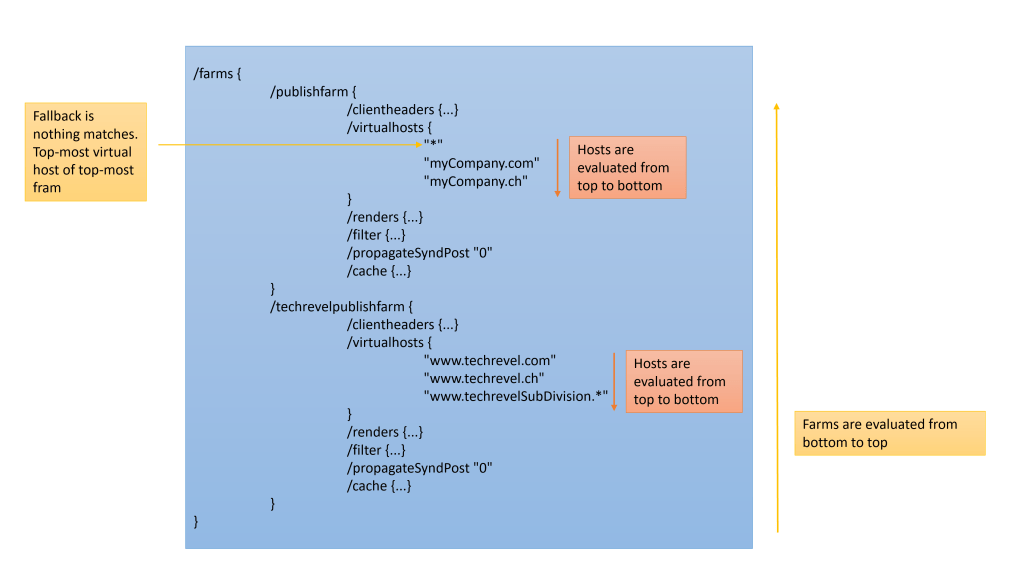
/virtualhostsconfiguration to determine the best-matching virtual host for incoming requests based on the host, URI, and scheme headers. The evaluation process occurs in the following order:- Starting from the lowest farm and progressing upwards in the
dispatcher.anyfile. - For each farm, Dispatcher evaluates the virtual host values from top to bottom.
- Dispatcher selects the first-encountered virtual host that matches all three criteria (host, scheme, and URI) of the request.
- If no virtual host matches both scheme and URI, the first-encountered virtual host that matches the request’s host is chosen.
- If no virtual host matches the host, the topmost virtual host of the topmost farm is used as the default.
- It’s recommended to place the default virtual host configuration at the top of the
virtualhostsproperty in the highest-level farm of thedispatcher.anyfile.
- It’s recommended to place the default virtual host configuration at the top of the
- Starting from the lowest farm and progressing upwards in the
URL Rewriting:
URL rewriting involves defining rules that transform incoming URLs before they reach the backend server. This can include appending query parameters, changing URL structure, or redirecting URLs to new locations. AEM Dispatcher uses the RewriteRule directive from the Apache mod_rewrite module for rewriting URLs.
Apache RewriteRule flags
Each rewrite rule is accompanied by Flags in []. Example RewriteRule ^old-page$ /new-page [R=301,L]
These flags modify the behaviour of your rewrite rules, enabling you to control aspects like redirection, rule processing, case sensitivity, and passing rewritten URLs to other modules. Each flag has a specific purpose and can be combined to achieve desired outcomes. Let’s explore some key flags:
- R – Redirect:
- The
Rflag is used to trigger an external redirection. - It sends an HTTP response to the client with the appropriate redirection status code (301 for permanent, 302 for temporary) and the new target URL.
- This flag changes the URL displayed in the browser’s address bar. Example:
RewriteRule ^old-page$ /new-page [R=301,L]
In this example, when a user accesses /old-page, they will be redirected to /new-page with a permanent (301) redirect status.
- L – Last Rule:
- The
Lflag indicates that if the current rule matches, no further rules below it will be processed in the current iteration of rewriting. - It’s used to stop the rewriting process for the current request cycle, even if there are more rules that might match. Example:
RewriteRule ^/en(.*)\.html$ /content/wknd/us/en.html [PT,L]
In this example, L Instructs Apache to stop processing further rules if this rule matches.
- NC – No Case:
- The
NCflag makes the pattern matching case-insensitive. - It allows the pattern to match regardless of the letter casing in the URL. Example:
RewriteRule ^/about$ /about-us [R=301,NC,L]
In this example, /About, /aBoUt, and /about will all be redirected to /about-us with a case-insensitive (NC) permanent (301) redirect.
- PT – Pass Through:
- The
PTflag is used to pass the rewritten URL to the next phase of processing. - It stops mod_rewrite processing and allows other modules to handle the rewritten URL.
- Example:
RewriteRule ^/en(.*)\.html$ /content/wknd/us/en.html [PT,L]
In this example, when a URL like /en.html is requested, the rule rewrites it to /content/wknd/us/en.html. The PT flag ensures that the rewritten URL is passed to the next module for further processing.
For more details, visit link
Debugging RewriteRules
For debugging rewrite rules, we need to set REWRITE_LOG_LEVEL to atleast trace2. The variable can be configured from following locations:
- Set REWRITE_LOG_LEVEL in conf.d/variables/global.vars
Define REWRITE_LOG_LEVEL trace2- Set variable via command line before starting dispatcher via docker of Cloud SDK. Example:
> SET REWRITE_LOG_LEVEL=trace1
> bin\docker_run src localhost:4503 8080
The rewrite logs for AEMaaCS SDK are written in /etc/httpd/logs/httpd_error.log
Sample logs:
[Thu Aug 31 10:46:08.251355 2023] [rewrite:trace2] [pid 360:tid 140516768209720] mod_rewrite.c(493): [client 172.17.0.1:41744] 172.17.0.1 - - [localhost/sid#7fcc9c28a588][rid#7fcc9bb75fc0/initial] init rewrite engine with requested uri /en.html
[Thu Aug 31 10:46:08.251441 2023] [rewrite:trace2] [pid 360:tid 140516768209720] mod_rewrite.c(493): [client 172.17.0.1:41744] 172.17.0.1 - - [localhost/sid#7fcc9c28a588][rid#7fcc9bb75fc0/initial] rewrite '/en.html' -> '/content/wknd/us/en.html'
[Thu Aug 31 10:46:08.251453 2023] [rewrite:trace2] [pid 360:tid 140516768209720] mod_rewrite.c(493): [client 172.17.0.1:41744] 172.17.0.1 - - [localhost/sid#7fcc9c28a588][rid#7fcc9bb75fc0/initial] forcing '/content/wknd/us/en.html' to get passed through to next API URI-to-filename handler
Example of few rewrite rules:
# Convert the url to lowercase.
RewriteMap tolower int:tolower
RewriteRule ^([^/]+)/?$ somedir/${tolower:$1} [PT]
# If it ends in .docx, change to .html.
RewriteRule ^(.*?)\.docx(\?.*)$ $1.html$2 [PT]# "url to lowercase" + "ends in .docx, change to .html"
RewriteMap lowercase int:tolower
RewriteRule (.*)\.[Dd][Oo][cC][xX](\?.*)?$ ${lowercase:$1}.html$2 [NC,R=301]# URL rewrite. No change in URL
RewriteRule ^/en(.*)\.html$ /content/wknd/us/en$1.html [PT,L]# Redirection. Change in URL
RewriteRule ^/language-masters/en(.*)\.html$ /content/wknd/language-masters/en$1.html [R=301,L]# Remaining rules are not visited with L flag
RewriteRule ^/en2(.*)\.html$ /content/wknd/language-masters/en2$1.html [PT,L]
# Rule will not be executed, after previous match
RewriteRule ^/content/wknd/language-masters/en2(.*)\.html$ /content/wknd/language-masters/en/adventures.html [PT,L]#NC is for case-insensitive. Next rule is visited.
RewriteRule ^/en1(.*)\.html$ /content/wknd/language-masters/en1$1.html [NC]
RewriteRule ^/content/wknd/language-masters/en1(.*)\.html$ /content/wknd/language-masters/en/adventures.html [PT,L]#Append the .html for those URL's ending with / before sending to publisher
RewriteCond %{REQUEST_URI} !^/$
RewriteRule ^/(.*)/$ /$1.html [PT,L,QSA]
# Replace the .html with /
# Caution: Dispatcher directly does not cache the page without an extension. It can be resolved by adding the .html extension in the apache rewrite module, like previous snippet
RewriteCond %{REQUEST_URI} \.html$
RewriteRule ^/(.*).html$ /$1/ [R=301,L,QSA]
# Mask the /content/wknd path
RewriteRule ^/content/wknd/(.*).html$ $1.html [R,L]
# redirect all root traffic to US home page
RewriteCond %{REQUEST_URI} ^/?$
RewriteRule ^(/)$ /us/en.html [R=301,L]
# Append /content/wknd before sending to publisher
RewriteCond %{REQUEST_URI} !^/apps
RewriteCond %{REQUEST_URI} !^/content
RewriteCond %{REQUEST_URI} !^/etc
RewriteCond %{REQUEST_URI} !^/home
RewriteCond %{REQUEST_URI} !^/libs
RewriteCond %{REQUEST_URI} !^/system
RewriteCond %{REQUEST_URI} !^/tmp
RewriteCond %{REQUEST_URI} !^/var
RewriteRule ^/(.*)$ /content/wknd/$1 [PT,L]
 Adobe Experience Cloud Blog
One thought on “AEM dispatcher: Filters, ignoreUrlParams, virtualhosts, rewrites”