In template editors, policies are used to configure component design. Example: component’s design configurations, allowed components for a container, mapping asset into components etc.
Configuring a template-editor’s policy is similar to a Static template’s design dialog. Following are the steps to define and access a new policy:
Step 1: Create policy configuration dialog
A component’s policy dialog is defined by adding a cq:design_dialog to the component. Example:
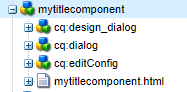
Sample .content.xml for design dialog:
<?xml version="1.0" encoding="UTF-8"?>
<jcr:root xmlns:sling="http://sling.apache.org/jcr/sling/1.0"
xmlns:cq="http://www.day.com/jcr/cq/1.0"
xmlns:jcr="http://www.jcp.org/jcr/1.0"
xmlns:nt="http://www.jcp.org/jcr/nt/1.0"
jcr:primaryType="nt:unstructured"
jcr:title="My Title Component"
sling:resourceType="cq/gui/components/authoring/dialog">
    <content jcr:primaryType="nt:unstructured"
       sling:resourceType="granite/ui/components/coral/foundation/container">
        <items jcr:primaryType="nt:unstructured">
            <tabs jcr:primaryType="nt:unstructured"
                sling:resourceType="granite/ui/components/coral/foundation/tabs"
                maximized="{Boolean}true">
                <items jcr:primaryType="nt:unstructured">
                    <properties
                        jcr:primaryType="nt:unstructured"
                        jcr:title="Available Stage types"
                        sling:resourceType="granite/ui/components/coral/foundation/fixedcolumns"
                        margin="{Boolean}true">
                        <items jcr:primaryType="nt:unstructured">
                            <content
                                jcr:primaryType="nt:unstructured"
                                sling:resourceType="granite/ui/components/coral/foundation/container"
                                margin="{Boolean}false">
                                <items jcr:primaryType="nt:unstructured">
                                    <title
                                        jcr:primaryType="nt:unstructured"
                                        sling:resourceType="granite/ui/components/coral/foundation/form/textfield"
                                        fieldLabel="Title"
                                        name="./title"/>
                                </items>
                            </content>
                        </items>
                   </properties>
               </items>
            </tabs>
        </items>
    </content>
</jcr:root>
Step 2: Configuring policy
Once the design dialog is created:
- Open the template in Structure mode.
- Click on the component
- Following button should now be available to configure the design properties.

Policy Storage and sharing:
- Policies are stored in following location by default:
/conf/project_name/settings/wcm/policies/component_name/policy_randomNumber
Policies can be also be stored in /apps or /libs folder. In this case the resource will be resolved in following preference order: /conf, /apps, /libs.
- Please observe in the policy path, that policies are stored centrally for a project. This enables authors to share a design policy among multiple templates.
- Template -> policy mapping is done by referring policy via:
cq:policy=/conf/project_name/settings/wcm/policies/component_name/policy_randomNumber

At location:
/conf/project_name/settings/wcm/templates/template-name/policies/jcr:content/root/component_name
Step 3: Accessing policy
A component’s policy configuration can be accessed by ContentPolicyManager. Sharing an example below:
import javax.annotation.PostConstruct;
import org.apache.sling.api.resource.Resource;
import org.apache.sling.api.resource.ResourceResolver;
import org.apache.sling.models.annotations.Model;
import org.apache.sling.models.annotations.injectorspecific.Self;
import org.apache.sling.models.annotations.injectorspecific.SlingObject;
import com.day.cq.wcm.api.policies.ContentPolicy;
import com.day.cq.wcm.api.policies.ContentPolicyManager;

@Model(adaptables = Resource.class)
public class StageModel {
    @SlingObject
    private ResourceResolver resourceResolver;

    /** The resource. */
    @Self
    protected Resource resource;

    private String title;

    @PostConstruct
    protected void constructStageType(){
        ContentPolicyManager policyManager = resourceResolver.adaptTo(ContentPolicyManager.class);
        if (policyManager != null) {
            ContentPolicy contentPolicy = policyManager.getPolicy(resource);
            if (contentPolicy != null) {
                title= (String) contentPolicy.getProperties().get("title");
            }
        }
    }

    /**
    * @return title
    */
    public String getTitle() {
        return title;
    }
}
 Adobe Experience Cloud Blog
So Hard to find this kind of information but I think this post will be very usefull
LikeLike
Thanks Derks. Glad that the post could help you !
LikeLike